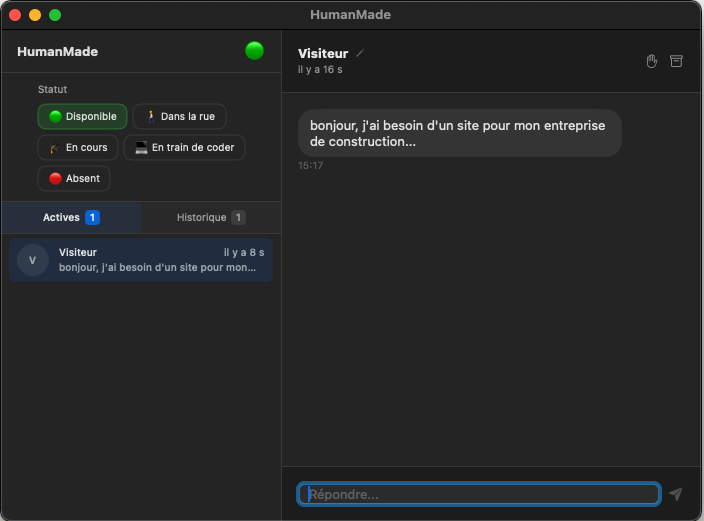
On thisishumanmade.com, when a visitor writes a message in the chat, I get a push notification on my iPhone - even if the app is killed. I reply, and the visitor sees my reply in real time. No Crisp, no Intercom, no SaaS. Just Firebase, some Swift, and a 50-line Cloud Function.
Here's how it all fits together.
Overview
The system consists of 4 components:
- The website - a vanilla JS chat widget that writes to Firebase Realtime DB
- Firebase Realtime DB - the real-time database that syncs everything
- The native app - SwiftUI, available on macOS (menu bar) and iOS (NavigationStack)
- A Cloud Function - triggered on every new message, sends a push via FCM
The website: vanilla JS chat widget
The chat on the site is a framework-free JavaScript widget. When a visitor opens the page, a conversationId is generated and stored in sessionStorage. Each message is written to Firebase Realtime DB via the JavaScript SDK:
// Ecriture d'un message visiteur
const msgRef = push(ref(db, `conversations/${convId}/messages`));
set(msgRef, {
  text: message,
  sender: visitorName,
  timestamp: Date.now()
});
The choice of sessionStorage (rather than localStorage) is deliberate: a refresh keeps the conversation, but a new tab creates a new one. This lets the visitor have independent conversations.
The Firebase SDK also listens for replies in real time with onChildAdded, which displays replies instantly without polling.
Firebase Realtime DB: the backbone
All the data flows through Firebase Realtime Database. No custom backend, no REST API to maintain. The structure is simple:
{
  "status": {
    "current": "available",
    "updatedAt": 1707840000000
  },
  "statusConfig": {
    "available": { "label": "Disponible", "emoji": "🟢", "chatMessage": "..." },
    "busy":      { "label": "Occupe",     "emoji": "🟠", "chatMessage": "..." },
    "offline":   { "label": "Absent",     "emoji": "⚪",  "chatMessage": "..." }
  },
  "conversations": {
    "-ABC123": {
      "visitorName": "Marie",
      "startedAt": 1707840000000,
      "lastMessageAt": 1707840060000,
      "status": "active",
      "messages": {
        "-MSG001": { "text": "Bonjour !", "sender": "Marie", "timestamp": ... },
        "-MSG002": { "text": "Salut Marie", "sender": "emmanuel", "timestamp": ... }
      }
    }
  },
  "admin": {
    "fcmToken": "dhOeso..."
  }
}
Why Realtime DB and not Firestore?
For this use case (1 admin, a few simultaneous visitors, simple data), Realtime Database is a better fit than Firestore:
- Latency - RTDB is optimized for small real-time data (~10ms vs ~50ms for Firestore)
- Pricing - billed on bandwidth + storage, not on number of reads (an RTDB observer counts as 1 read, not N)
- Native SSE - the Server-Sent Events protocol lets you plug in any REST client without an SDK
Firestore shines for complex queries, composite indexes, and horizontal scaling. Here, none of that is needed.
Security rules
{
  "rules": {
    "conversations": { ".read": true, ".write": true },
    "admin": {
      "fcmToken": { ".read": false, ".write": true }
    }
  }
}
The FCM token is write-only. The iOS app can write it, but no client can read it. Only the Cloud Function accesses it - via the Admin SDK, which bypasses security rules. This prevents a visitor from retrieving the token to send unauthorized pushes.
The macOS app: menu bar with SwiftUI
The macOS app lives in the menu bar. No dock icon, no permanent window - just a discreet icon with an unread message badge.
It uses the Firebase iOS SDK (which also works on macOS via Swift Package Manager) and maintains an observer .observe(.value) on the node /conversations. Every change in the DB triggers an instant callback.
// Observer temps reel sur toutes les conversations
conversationsHandle = db.child("conversations")
    .observe(.value) { snapshot in
        // Parse + diff + notification locale si nouveau message
    }
When a new visitor message arrives, the app:
- Detects unknown messages by diffing IDs (
Setexisting vs new) - Increments the counter
unreadCount - Sends a local notification via
UNUserNotificationCenter
On macOS, no need for FCM push - the app is always alive in the menu bar. Firebase observers never die.
The iOS app: same code, different problems
The iOS app shares 90% of the code thanks to #if os(iOS) / #if os(macOS). The views are in conditional extensions:
struct MenuBarView: View {
    var body: some View {
        #if os(iOS)
        iOSBody      // NavigationStack
        #else
        macOSBody    // HStack avec sidebar
        #endif
    }
}
The iOS background problem
On macOS, Firebase observers run indefinitely. On iOS, it's a different story:
- iOS suspends the app ~30 seconds after going to background
- Network connections are cut - Firebase observers die
- Messages pile up and arrive all at once on reopening
That's why local notifications aren't enough on iOS. You need a server-side system that pushes notifications even when the app is dead.
FCM + Cloud Function: push that actually works
The solution has two parts:
1. The iOS app registers with FCM
On launch, the app requests an APNs token from Apple, passes it to Firebase Cloud Messaging, and stores the FCM token in the DB:
// iOSAppDelegate.swift
class iOSAppDelegate: NSObject, UIApplicationDelegate, MessagingDelegate {
    func application(_ application: UIApplication,
                     didFinishLaunchingWithOptions ...) -> Bool {
        FirebaseApp.configure()
        Messaging.messaging().delegate = self
        application.registerForRemoteNotifications()
        return true
    }

    // Apple donne un token APNs binaire -> on le passe a FCM
    func application(_ application: UIApplication,
                     didRegisterForRemoteNotificationsWithDeviceToken deviceToken: Data) {
        Messaging.messaging().apnsToken = deviceToken
    }

    // FCM echange le token APNs contre son propre token string
    func messaging(_ messaging: Messaging,
                   didReceiveRegistrationToken fcmToken: String?) {
        guard let token = fcmToken else { return }
        // Stocke dans Firebase RTDB a /admin/fcmToken
        FirebaseService.shared.storeFCMToken(token)
    }
}
The key point: there are two different tokens. The APNs token is a binary blob from Apple. FCM exchanges it for its own string token. It's this FCM token that the Cloud Function uses.
2. The Cloud Function sends the push
A Cloud Function onValueCreated triggers on every new message in the DB:
// functions/index.js
const { onValueCreated } = require("firebase-functions/v2/database");

exports.notifyNewMessage = onValueCreated(
  { ref: "/conversations/{convId}/messages/{msgId}", region: "us-central1" },
  async (event) => {
    const message = event.data.val();

    // Ignore nos propres reponses
    if (message.sender === "emmanuel") return null;

    const visitorName = await getVisitorName(event.params.convId);
    const fcmToken = await getFCMToken();
    if (!fcmToken) return null;

    await getMessaging().send({
      token: fcmToken,
      notification: { title: visitorName, body: message.text },
      data: { conversationId: event.params.convId },
      apns: { payload: { aps: { sound: "default", badge: 1 } } }
    });
  }
);
Important points:
onValueCreatedonly triggers on creation of a node, not on modification - no double notification if a message is edited- The filter
sender === "emmanuel"avoids notifying yourself - The region
us-central1is mandatory - RTDB triggers must be in the same region as the database - If the token is invalid (app uninstalled), the function automatically cleans it up from the DB
The complete flow of a notification
Avoiding duplicate notifications
Without precautions, on iOS you'd receive two notifications when the app is in foreground:
- A local notification (from the Firebase observer still running)
- A push notification (from the Cloud Function via FCM)
The solution is simple: on iOS, the sendNotification() method does an immediate return . Local notifications are disabled - FCM takes care of it:
private func sendNotification(title: String, body: String, conversationId: String) {
    #if os(iOS)
    return  // FCM gere les push sur iOS
    #else
    // macOS : notification locale classique
    let content = UNMutableNotificationContent()
    content.title = title
    content.body = body
    content.sound = .default
    UNUserNotificationCenter.current().add(...)
    #endif
}
Badge and navigation handling
Badge on the icon
The Cloud Function sends badge: 1 in the APNs payload. When the user opens the app, the badge resets to zero via scenePhase :
// HumanMadeApp.swift
WindowGroup { ... }
.onChange(of: scenePhase) { phase in
    if phase == .active {
        UNUserNotificationCenter.current().setBadgeCount(0)
    }
}
Tapping the notification -> the right conversation
The FCM payload includes data.conversationId. When the user taps the notification, the NotificationDelegate retrieves the ID and stores it in a published property. The NavigationStack listens for this change and pushes the right view:
// NotificationDelegate
func userNotificationCenter(_ center: ..., didReceive response: ...) {
    let convId = response.notification.request.content.userInfo["conversationId"]
    FirebaseService.shared.pendingConversationId = convId
}

// MenuBarView (iOS)
.onChange(of: firebase.pendingConversationId) { convId in
    guard let convId else { return }
    firebase.pendingConversationId = nil
    navigationPath = NavigationPath()  // Reset
    navigationPath.append(convId)      // Push la conversation
}
Typing indicator ("is typing...")
When I type a reply on the iOS app, the visitor on the site sees the three animated dots appear - exactly like on iMessage or WhatsApp. The implementation relies on an ephemeral node in Firebase.
The Firebase node
Each conversation can contain a typingnode. This node only exists while Emmanuel is typing - it's removed as soon as he stops or sends the message:
"conversations": {
  "-ABC123": {
    "messages": { ... },
    "typing": true    // existe uniquement pendant la frappe
  }
}
Using removeValue() rather than setValue(false) is deliberate: it avoids storing unnecessary data. The node only exists when it has a reason to.
On iOS: typing detection
The app observes changes to the text field via .onChange(of: replyText). On every keystroke, it writes typing: true to Firebase and restarts a 2-second timer:
// ChatView.swift - detection de frappe
TextField("Repondre...", text: $replyText)
    .onChange(of: replyText) { newValue in
        if !newValue.trimmingCharacters(in: .whitespaces).isEmpty {
            firebase.setTyping(conversationId: conversationId, isTyping: true)
        }
    }

// A l'envoi : reset immediat
func sendReply() {
    firebase.setTyping(conversationId: conversationId, isTyping: false)
    firebase.sendReply(conversationId: conversationId, text: text)
}
Debounce on the service side
The FirebaseService manages an internal timer. Every call to setTyping(isTyping: true) restarts the 2-second timer. If the user stops typing, the timer expires and automatically removes the node:
// FirebaseService.swift
func setTyping(conversationId: String, isTyping: Bool) {
    let typingRef = db.child("conversations/\(conversationId)/typing")

    if isTyping {
        typingRef.setValue(true)
        typingRef.onDisconnectRemoveValue()  // securite : cleanup si crash

        typingTimer?.cancel()
        let timer = DispatchWorkItem {
            typingRef.removeValue()
        }
        typingTimer = timer
        DispatchQueue.main.asyncAfter(deadline: .now() + 2.0, execute: timer)
    } else {
        typingTimer?.cancel()
        typingRef.removeValue()
    }
}
The onDisconnectRemoveValue() is a safeguard: if the app crashes or loses its connection, Firebase automatically removes the typing node server-side. Without it, the visitor would see a ghost "typing..." indefinitely.
On the website: displaying the dots
The site listens to the typing node with a onValue, listener. When the value becomes true, the three animated dots appear. When it disappears, they hide:
// Listener sur le noeud typing
fb.onValue(fb.ref(fb.db, 'conversations/' + convId + '/typing'), function(snapshot) {
  if (snapshot.val() === true) {
    if (!document.getElementById('typingIndicator')) showTyping();
  } else {
    hideTyping();
  }
});
The functions showTyping() and hideTyping() already existed for the intro sequence - they're reused as-is for the real-time indicator.
The complete flow
Project structure
Tech stack
- Website - vanilla HTML/CSS/JS, Firebase JS SDK v11 (ES modules)
- Database - Firebase Realtime Database (Blaze plan, actual cost: 0 euros/month)
- Native app - SwiftUI (cross-platform macOS + iOS), Firebase iOS SDK 12.9
- Push notifications - Firebase Cloud Messaging + APNs
- Cloud Function - Node.js 20, firebase-functions v5, trigger
onValueCreated - Auth - none (single-admin, open DB rules, FCM token protected write-only)
What it costs
With the Blaze plan (pay-as-you-go):
- Realtime Database - free tier: 1 GB storage, 10 GB/month transfer. More than enough.
- Cloud Functions - free tier: 2 million invocations/month. For a few messages a day, that's ~0.
- FCM - free, unlimited.
Total cost: 0 euros/month. The only investment is the Apple Developer account at 99 euros/year (required for APNs push).